Account Protection Feature: Manage Your Trading Risks
Set up protection for your entire Slave account.

We've added some new features to Account Protection based on your feedback. This post breaks down what's new, how everything works under the hood, and answers the questions we keep getting. But first, let's talk about what Account Protection is actually trying to do.
What Does Account Protection Do? The Goal Is Simple.
When your account hits a limit you've defined, the copier should automatically stop taking on new risk. That might mean stopping new entries, only allowing closes, or closing everything and shutting down copying entirely, depending on what you choose.
The point isn't to predict the market. Nobody can do that. The point is to make sure your copier doesn't keep placing new orders after your line in the sand has already been crossed.
With these updates, you now have more ways to define that line. You can set thresholds using dollar amounts, percentages, or even unrealized PnL (your floating profit/loss). That matters because not everyone wants protection to trigger based on the same measurement. Some traders care about the day's result. Others care about the drawdown from a peak. Some care about their open exposure right now.
How It Works:
Account Protection is basically a rules system that monitors your copying account's performance. When a rule triggers, it automatically switches your copier into a "protected" mode. You get to choose what that mode looks like: Disable Copy, Close Only, or Close All & Disable Copy. We’ll define each of these later. Protection rules are configured across four sections. Let's walk through each one.
Daily Stop Loss: Limiting Today's Losses
Daily Net Loss triggers when your daily result goes negative by a certain amount or percentage. It's comparing where you are now versus where you started the day.
Daily Drawdown is the maximum intraday decline from your highest P&L of the day. It stops you when you’ve given back more than the allowed amount, even if you’re still positive.
Which should you use? If you just want a hard "don't lose more than X today" rule, go with daily net loss. If you're more worried about letting winners turn into losers, daily drawdown is your friend.
Daily Take Profit: Locking In Gains
Once you’ve reached your chosen daily profit target, set as either a fixed dollar amount or a percentage, the copier automatically stops for the rest of the day to lock in gains and prevent overtrading or giving back profits after a good run.
Stop Loss Protection: The Bigger Picture
These are the longer-term rules that don't reset each day.
Absolute Equity Stop is the simplest. If your equity drops below $X, trigger. No percentages, no peaks, just a hard floor.
Net Loss triggers when your overall losses from your starting point exceed a threshold.
Drawdown triggers when you've fallen too far from your all-time peak. This is popular because it protects profits. If your account grew from $10K to $20K and you want to make sure you never give back more than 25%, this is what you'd use.
Unrealized Loss triggers based on floating losses in open trades. This one reacts faster than net loss because it doesn't wait for positions to close.
Take Profit Target: Hitting Your Goal
The mirror image of stop loss protection. Set an equity target or profit goal, and when you hit it, the copier stops. This is especially useful if you're managing a funded account with specific profit targets.
Understanding the Dashboard
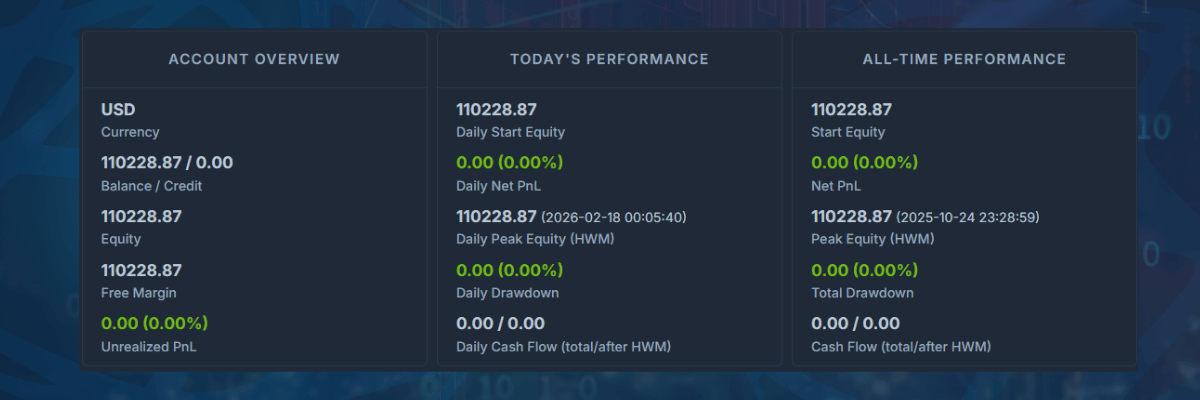
Account Protection watches specific account metrics and reacts when one of them reaches your limit. You'll see three panels at the top of the page:
Account Overview shows what your account looks like right now. Think of it as the live snapshot.
Today's Performance answers one question: "How has the account performed since today started?" It resets each day.
All-Time Performance shows how you're doing overall, across the account's tracked history (starting from when you connected the account. Also, please note that if the account has been disconnected for days, we cannot get the cashflow nor trades during that offline period. Once the account reconnects, we will only get the last 24h of data from that point). This panel doesn't reset daily, and turning the account on/off won't reset these numbers either.
Key Terms You'll See
Equity is your live account value including open profit/loss. If your balance is $10,000 but you've got $500 in floating losses, your equity is $9,500. This number moves constantly because open positions change value.
Daily Start Equity is what your equity was at the beginning of today. The platform uses this as the baseline for daily rules.
Peak Equity (sometimes called High Water Mark) is the highest your equity has reached. There's a daily version and an all-time version. This matters for drawdown calculations.
Unrealized PnL is the profit or loss from trades that are still open. It hasn't been "locked in" yet because nothing has closed.
Net vs. Drawdown vs. Unrealized: What's the difference
These three concepts sound similar, but they measure very different things. Mix them up, and your protection won't work the way you expect.
Net Profit/Loss is your total result for the period you're measuring, either today or all-time. Made $500 today? That's your daily net profit. Lost $2,000 overall since you started? That's your all-time net loss. It includes trading costs and is measured against your starting point.
Drawdown is different. It's not about whether you're up or down overall, it's about how far you've fallen from your highest point. Say your account peaked at $15,000 and now it's at $13,000. Your drawdown is $2,000 (or about 13%), even if you started with $10,000 and are technically still profitable. Drawdown measures how much you've "given back."
Unrealized looks only at open trades. Your closed trades don't factor in. This can spike hard during volatile moves because it's purely about what's happening right now in your open positions.
Here's a Real Example
Say you start the day at $10,000 equity. The market moves in your favor and you peak at $10,800. Then things reverse and you're now at $10,200.
Your daily net profit is +$200 (you're up from the start).
Your daily drawdown is -$600 (you've dropped from the peak).
If you set a "5% daily net loss" protection, it hasn't triggered, you're still positive. But if you set a "5% daily drawdown" protection, you're getting close. Same account, same day, completely different behavior depending on which rule you chose.
Why Baseline Matters
If you set a rule at 5%, the system needs to know: 5% of what?
For daily rules: A 5% Daily Net Loss is measured from Daily Start Equity (start of today), while 5% Daily Drawdown is measured from Daily Peak Equity (today's high). That's why drawdown can trigger even if you're still up on the day.
For all-time rules: Same idea. A 5% Overall Net Loss is measured from Start Equity (account start), while 5% Overall Drawdown is measured from Peak Equity (all-time high). So it can trigger even if you're still up overall.
What Actually Happens When a Rule Triggers
When your protection kicks in, the copier switches modes. You have three options:
Disable Copy stops copying new trades but leaves your existing positions alone. Use this if you want to stop adding risk but don't want to force exits.
Close Only means the copier will still copy close signals, but won't open anything new. Your positions can be managed, but no new exposure gets added.
Close All & Disable Copy closes everything and stops the copier entirely. The nuclear option. Use this when you want out completely.
In all cases, you'll need to manually reactivate the copier once you're ready to trade again.
A Few Things to Keep in Mind
Your final balance won't be exact. When protection triggers and closes positions, those orders go out as market orders. Slippage, spread, and broker execution all play a role. If you set a 5% daily loss limit, you might end up at 5.3% or 4.8%. Account Protection is a control mechanism, not a precision instrument.
Percentage rules scale with your account. A 5% rule means different dollar amounts depending on your equity. Fixed dollar amounts stay the same regardless. Choose based on what you're actually trying to control.
Different rules can conflict. If you have both a daily drawdown rule and a daily net loss rule, whichever one triggers first wins. Make sure you understand how they interact.
Test before you trust. If your platform has a demo or paper trading mode, run your protection settings there first. Better to find out your rules don't work the way you expected when there's no real money on the line.
That's Account Protection in a nutshell. Set your rules, understand what each metric actually measures, and let the system handle the rest. If this is your first time here, you can grab our Free 30 EUR credit to test the trade copier risk-free! Questions? Please reach out to our friendly support team! Keep crushing!
The information provided in this content is for educational and informational purposes only. It does not constitute financial advice or a recommendation for any specific trading strategy. Trading involves risk, and you should carefully consider your own financial situation and seek professional advice before making any trading decisions.